Settings
This is the central place to configure TeslaLogger. In this dialog, the login credentials were already entered during the initial setup. But there are a number of other options:
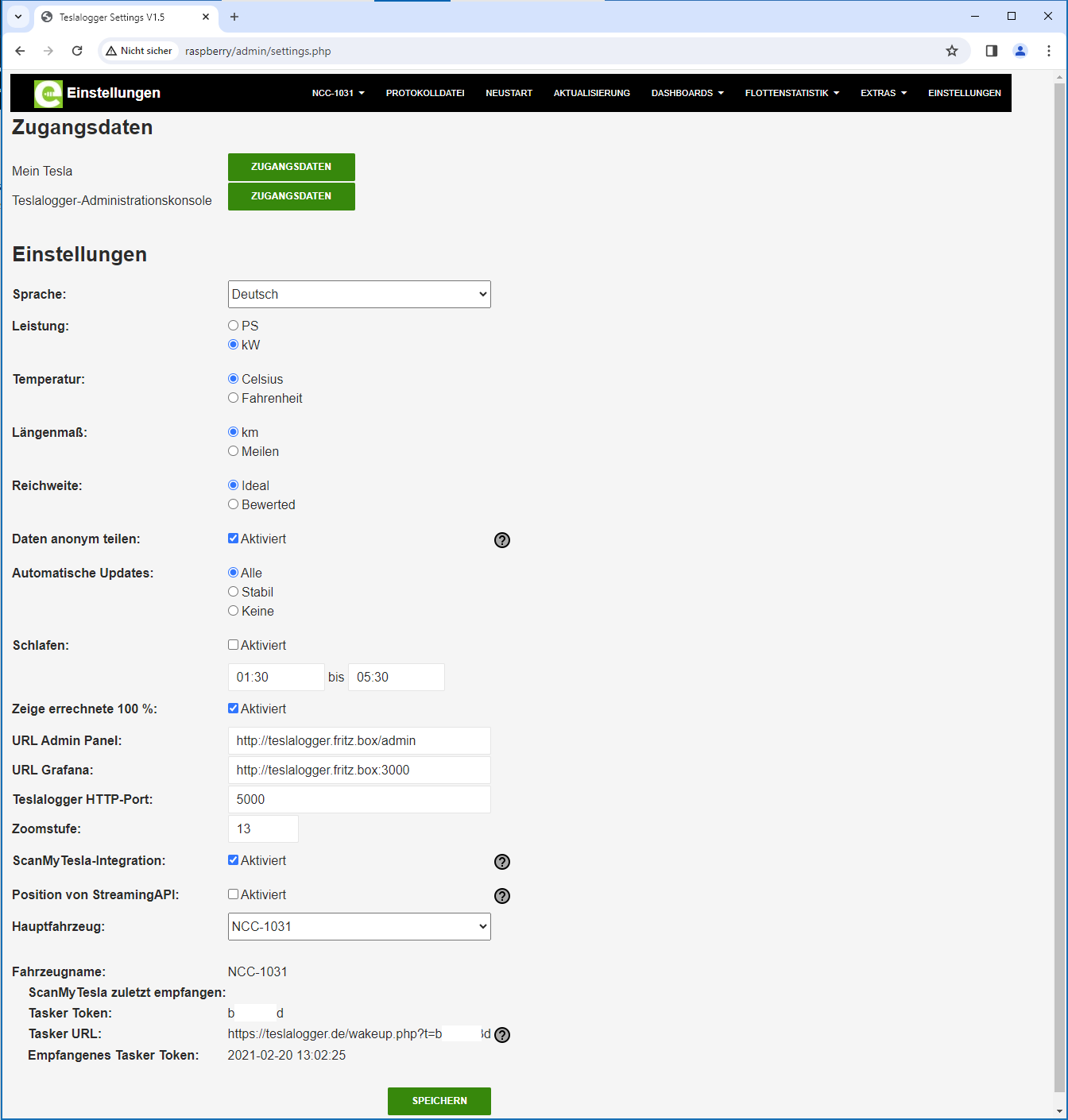
In addition to the obvious things like "Credentials", "Language", "Performance", "Temperature" and "Distance unit", there is the following: • "Admin Panel URL" and "Grafana URL": Nothing needs to be changed here unless the TeslaLogger is not addressed via the name "raspberry" in the home network. This is explained on page 33, "Address by Name Instead of IP Address". • The "Zoom level" defines how many details the map in the admin panel should display. • "Share data anonymously". If this checkbox is set, various information from all TeslaLogger users can be collected on https://teslalogger.de. This data is available in the menu under "Fleet Statistics" and is described below. Everyone is free not to share their data, but we encourage you to enable sharing, as many Tesla drivers benefit from this. • "Automatic Updates": Here you can set whether all (potentially also unstable beta versions) updates, no updates at all, or only stable main versions should be installed. • "Sleep". This is an automated function that behaves exactly like the menu functions "Suspend" and "Wakeup" at a defined time. • "Main vehicle" defines which of several defined vehicles should always be displayed first when the admin panel or Grafana starts.