MQTT Settings
Since March 2024, MQTT is configured via this menu.
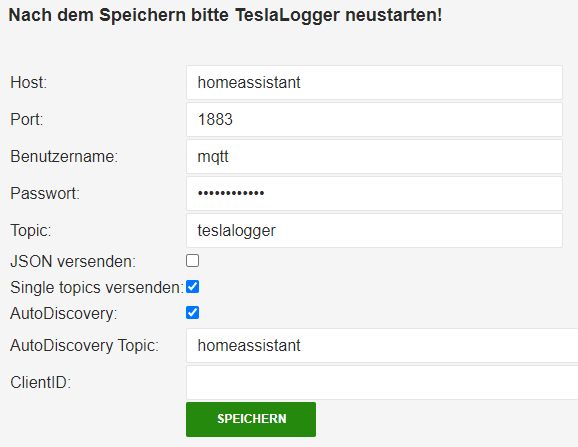
You need a set up MQTT broker. In this example, an MQTT broker from a HomeAssistant installation is used.
In the "Host" field, enter the hostname or IP address of the broker. This is a required field! Port is set to 1883 by default and does not need to be changed in most cases. If the MQTT broker requires login credentials, please enter username and password, otherwise leave blank. Topic is the name of the topic under which the data from TeslaLogger will later be published on MQTT.
TeslaLogger can send data in 2 ways:
- as JSON, published under "TOPIC/json/CAR_VIN/currentjson"
- as individual topics, published under "TOPIC/car/CAR_VIN/PARAMETER_NAME" as single topics
One of the options must be activated, otherwise no data will be published.
If you activate AutoDiscovery, smart home systems like HomeAssistant, OpenHAB and others will automatically recognize and set up the data from TeslaLogger. For this function, the "Single Topics" option must be activated. For autodiscovery, "homeassistant" is set as the topic by default and usually does not need to be changed.
TeslaLogger generates a random ClientID when connecting to an MQTT broker. In rare cases, a unique ClientID must be assigned. Please only fill in this field if it is really necessary, otherwise it can lead to connection problems.
The settings are only applied after "Save" and subsequent restart!