Optimization with a Fritz!Box
The Fritz!Box, which is widely used in many German-speaking countries, offers a few nice functions to simplify the use of TeslaLogger. Similar things are also possible with other home routers and with professional infrastructure.
Fixed IP
TeslaLogger is like a server on the internet, but at home. Servers on the internet normally have a fixed IP address so that they are easier to reach, and therefore it makes sense to assign a fixed IP address to the device on which TeslaLogger runs at home as well.
Address by Name Instead of IP Address
No system on the internet is addressed directly with its IP address, but with its name, for example https://teslalogger.de. Exactly the same is possible with TeslaLogger at home. In the example, we give the Raspberry a name so that it can be addressed at home via https://teslalogger.fritz.box afterwards. The following refers to a Fritz!Box with firmware version 7.x; with older versions it is basically similar.
- Log in to the Fritz!Box with the web browser. This usually works with https://fritz.box
- Make sure that "Advanced view" is active; for this, press the Fritz!Box username at the top right, normally "Admin". Activate the switch for "Advanced view" if this has not been done yet.
- Select "Home Network", then "Network"
- Search for the Raspberry in the list and select the edit button on the right in the same line
- Adjust the name; in the example we used "teslalogger"
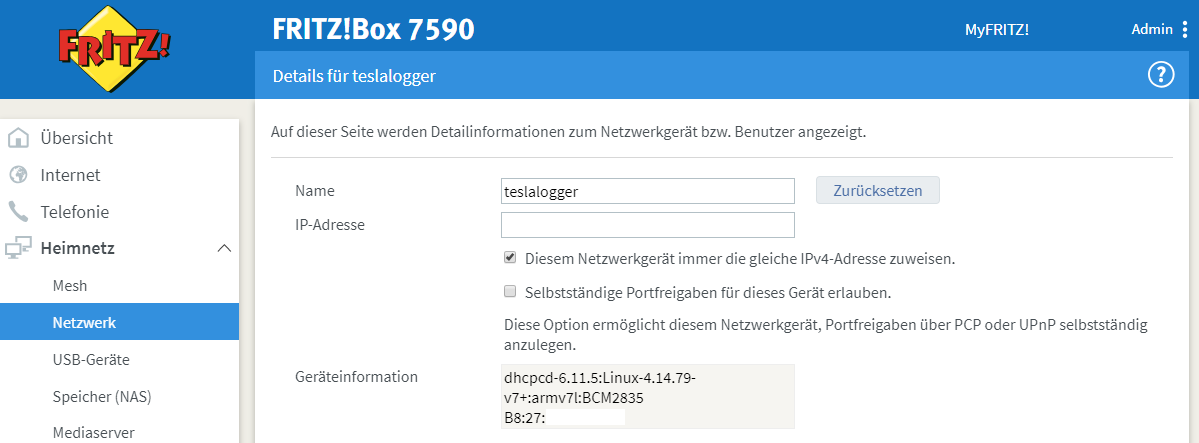
- The IP address is also defined here. This can basically remain as it is, but the checkmark at "Always assign the same IPv4 address to this network device" should be selected
- Press "OK" at the bottom right. The Raspberry is now accessible under the new name